NexM Portfolio · Concept Product
SupportAI
AI-Powered Customer Support Workspace
Built by NexM to show how modern support teams should work: tickets, AI-assisted replies, and a knowledge base agents actually use, all in one connected workspace.
Role
Product Strategy, UI/UX Design, Frontend Development
Category
Customer Support SaaS
Status
Concept Project
SupportAI is a concept SaaS product designed and built end-to-end by NexM — from product strategy and UX to a fully interactive frontend prototype. AI is embedded directly into the ticket workflow to help agents respond faster, stay consistent, and understand each customer's context clearly — not bolted on as a separate chatbot.
The Problem
Support teams are stretched thin, and customers can feel it
Modern support teams juggle tickets across email, chat, and social — and the tools meant to help often slow them down instead.
Tickets scattered across channels
Email, chat, and social messages land in different places, so agents piece together the full picture by hand before they can even reply.
Slow response times
Without a clear view of what's urgent, easy tickets and critical ones wait in the same queue — and customers notice the delay.
Inconsistent replies between agents
Two agents can give two different answers to the same question, with no shared source of truth to keep tone and accuracy consistent.
A knowledge base nobody uses
Help articles exist, but agents rarely have time to search them mid-conversation, so the same answers get retyped from scratch.
Managers lack visibility into quality
Without a clear view of response times, volume, and satisfaction, a quality problem usually surfaces only after a customer complains.
Urgent tickets get missed
A high-priority issue can sit unnoticed in a busy queue until it turns into an escalation — and by then, the damage is done.
Repetitive work slows agents down
Writing near-identical replies to common questions eats hours that could go toward tickets that actually need a human's judgment.
Our Solution
One workspace, where AI helps without getting in the way
SupportAI combines ticket management, AI-assisted replies, a knowledge base, and support analytics into a single connected workspace — instead of bolting a chatbot onto an old help desk. Every screen is built around one idea: give agents the context and the next best action right where they're already working. Priority, customer history, and a suggested reply surface automatically, so agents spend their time solving problems, not searching for information.
Every channel, one queue
Tickets from email, chat, and social land in a single prioritized queue, so nothing waits in the wrong inbox.
AI drafts the first pass, agents keep control
A suggested reply appears grounded in the ticket and the knowledge base — agents review, edit, and send, or write their own.
A knowledge base agents actually reach for
Relevant articles surface automatically inside the ticket, so agents don't have to stop and search for them.
Visibility managers can act on
Response times, ticket volume, and CSAT are visible at a glance, not buried in a spreadsheet someone has to build.
Signals ranked by urgency, not timestamp
Notifications surface what actually needs attention first, so an urgent issue doesn't wait behind ten routine ones.
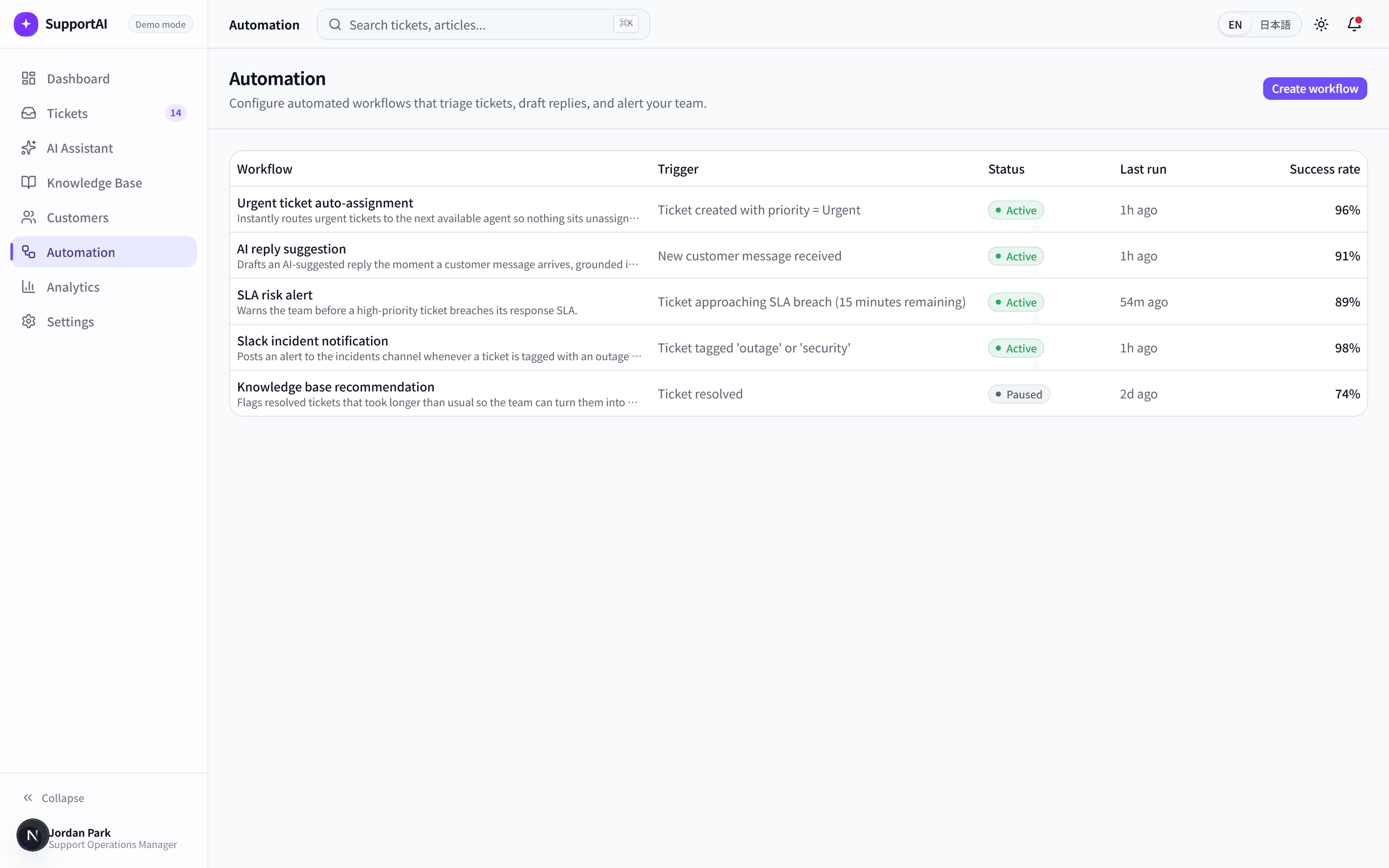
Full customer context, every time
Plan, past tickets, and account health show up alongside every conversation, so agents never start from zero.
Product Walkthrough
A tour of the workspace
Nine connected pages, each designed around a single question: what does this agent need to see right now?
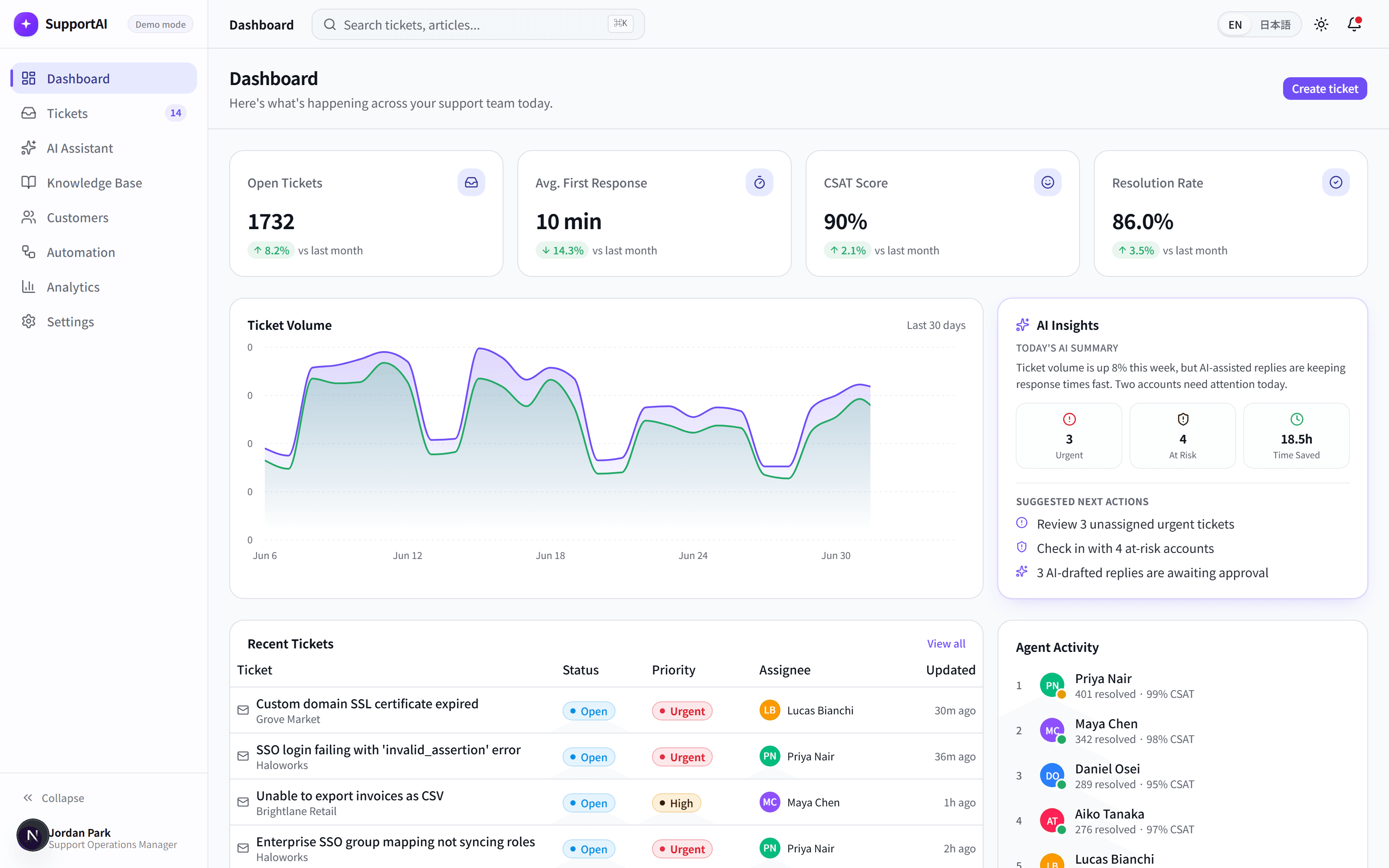
Dashboard
A single view of open tickets, response times, CSAT, and what needs attention today — instead of five separate reports.
An AI insights card highlights urgent tickets, at-risk customers, and how much time AI-assisted replies saved this week.
Agents and managers start the day knowing exactly where to look first.
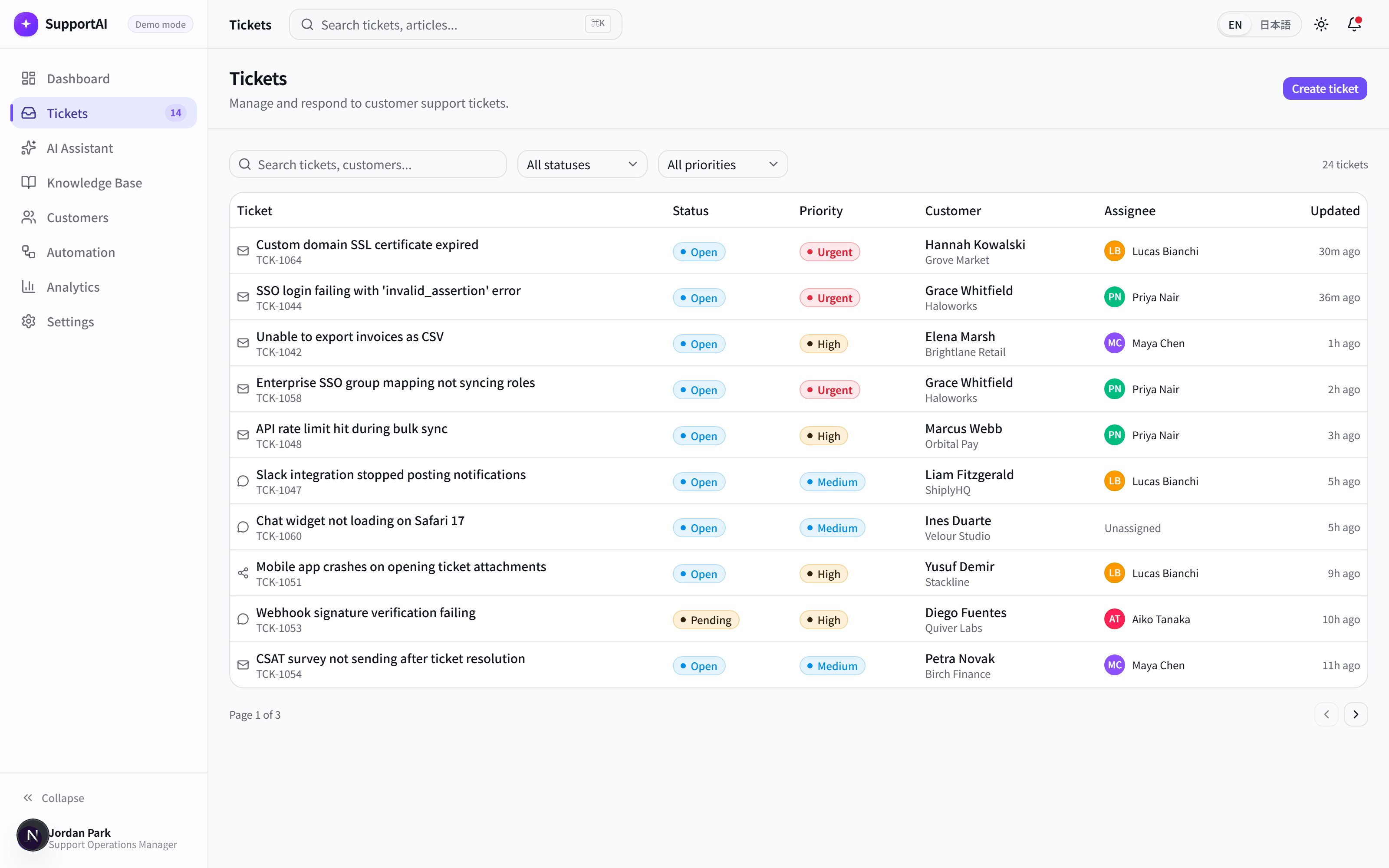
Tickets
Every conversation across channels in one searchable, filterable list, with status and priority visible at a glance.
Priority is suggested automatically based on ticket content, so urgent issues surface without manual triage.
Nothing sits in the wrong place in a busy queue.
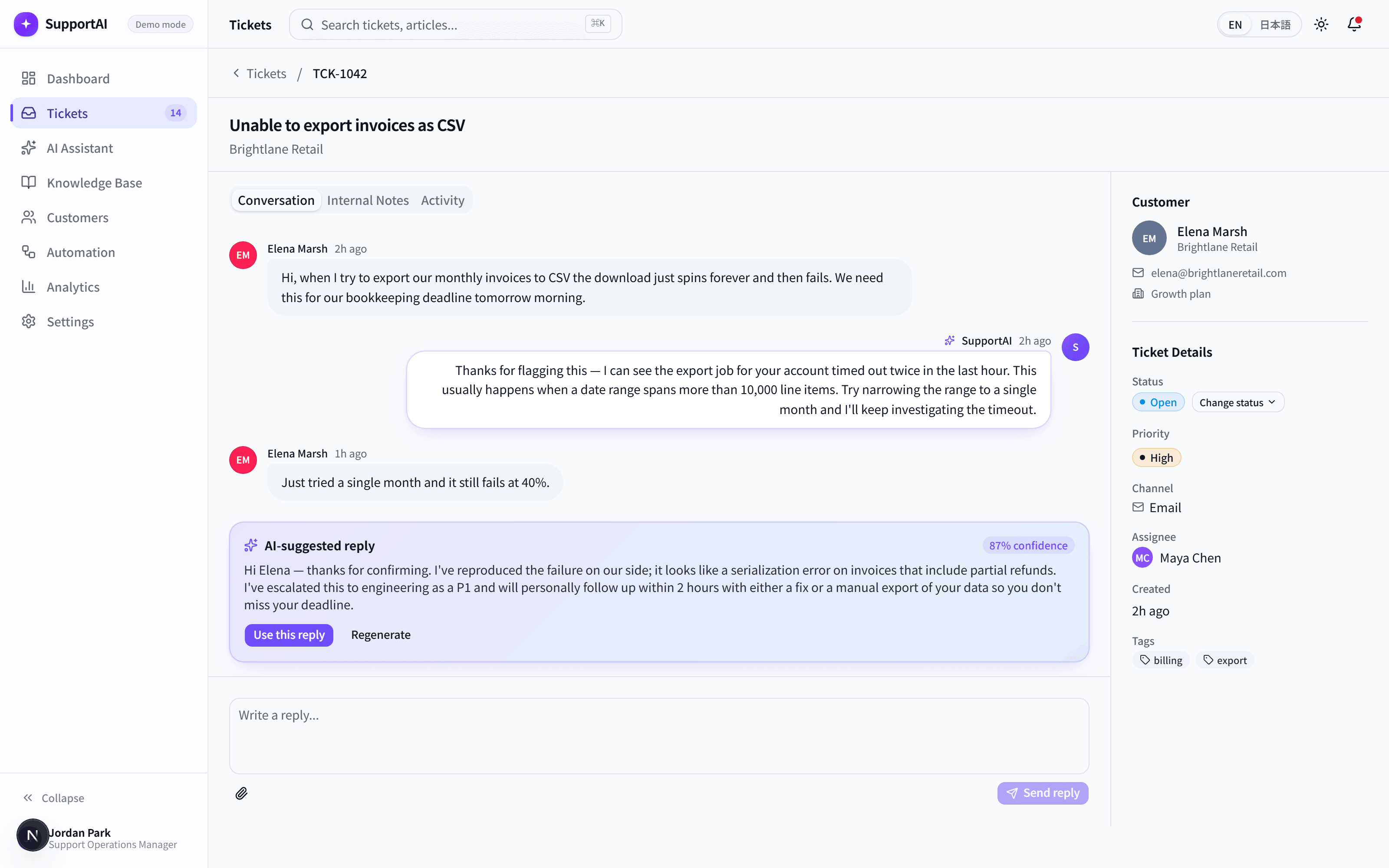
Ticket Detail
The full conversation, internal notes, and customer details together in one connected view.
A suggested reply is generated from the conversation and the knowledge base, ready to send, edit, or regenerate.
Agents reply faster without sacrificing accuracy or tone.
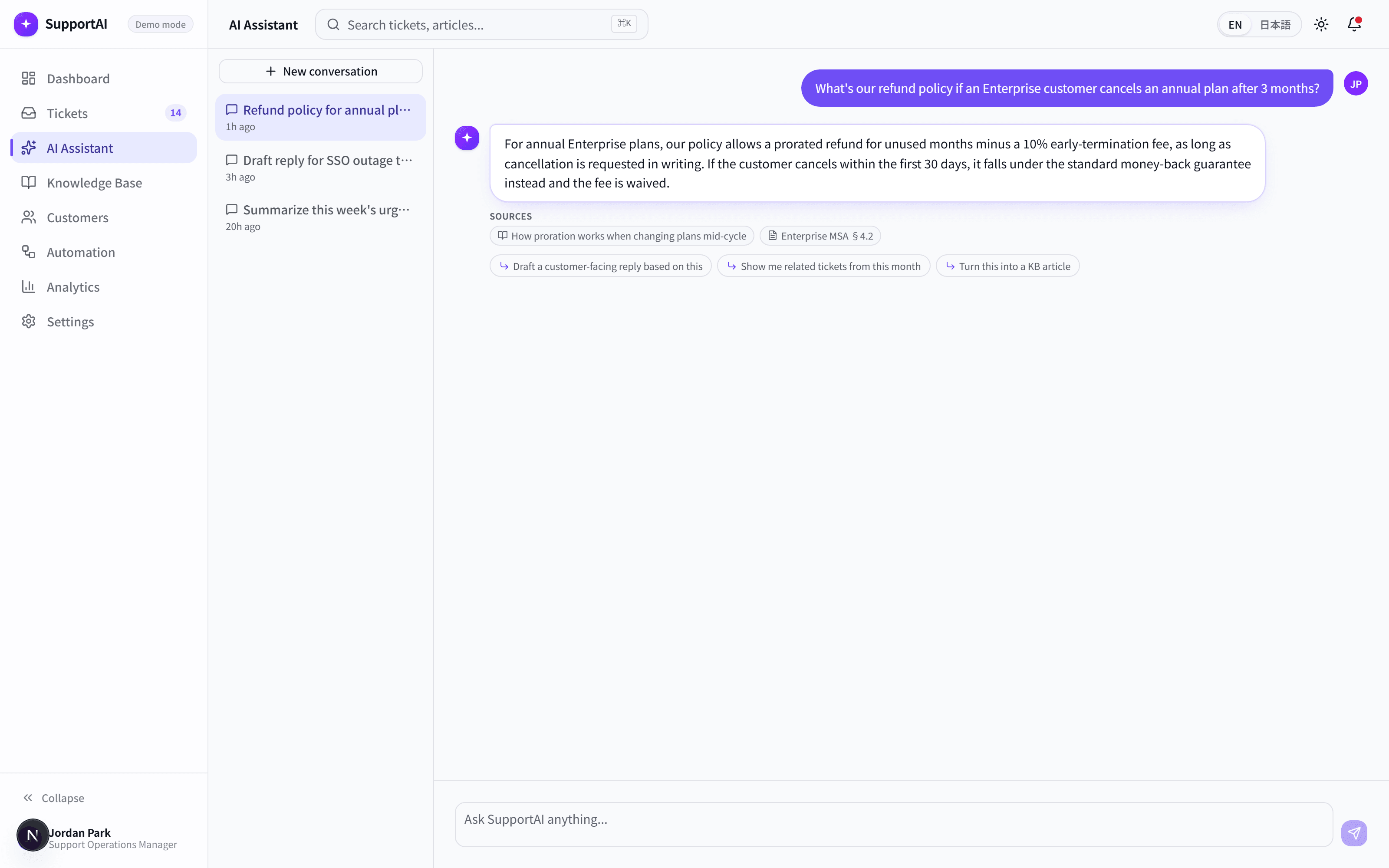
AI Assistant
A dedicated space to ask questions about tickets, draft replies, or summarize trends across the team.
Answers come with structured steps, notes, and linked sources — not just a wall of generated text.
Agents get a second pair of hands for research, not just a chatbot.
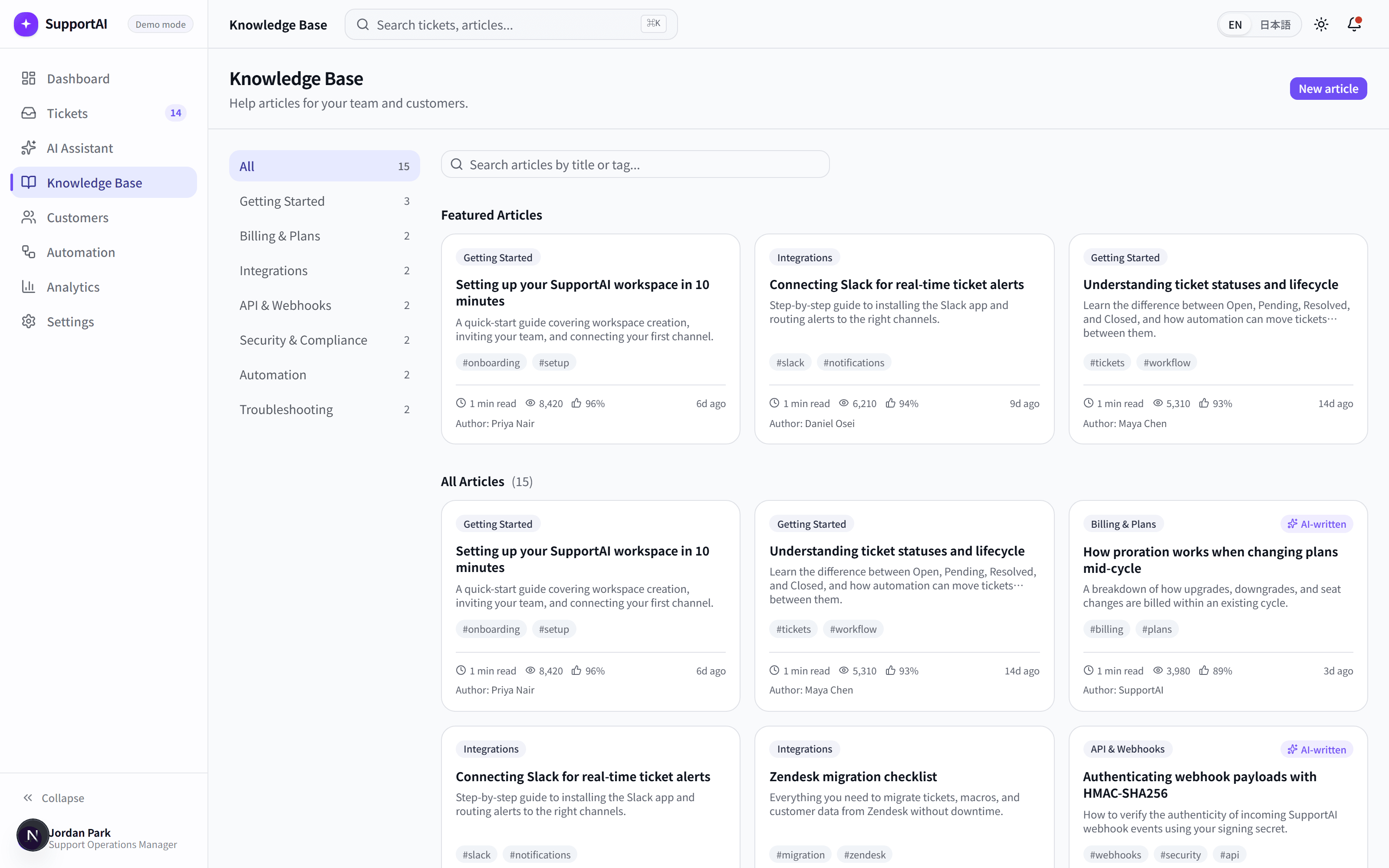
Knowledge Base
Searchable help articles with reading time, view counts, and helpfulness ratings, written for agents and customers alike.
Agents can ask the AI Assistant about any article directly from its detail view.
Answers get reused instead of rewritten from scratch every time.
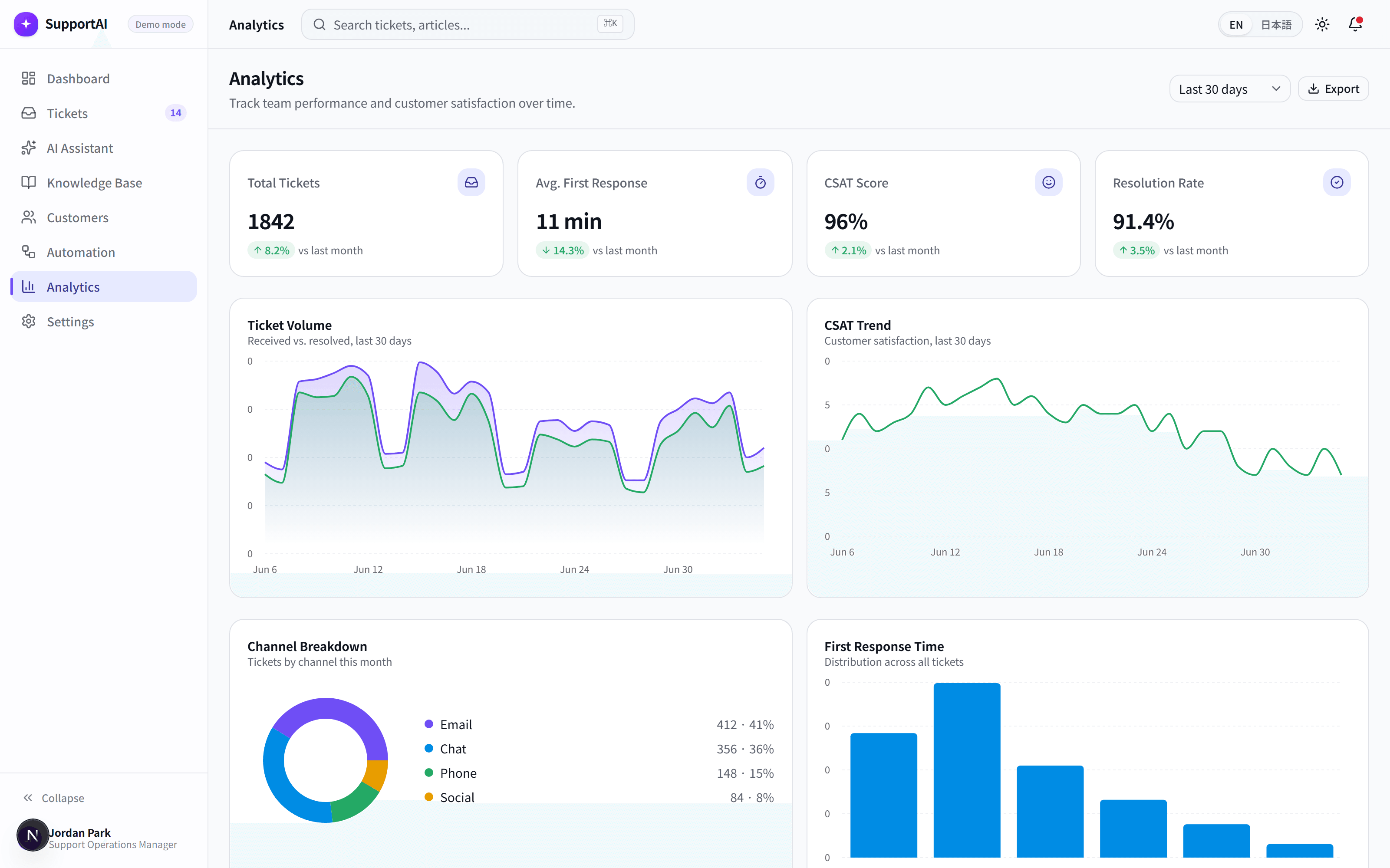
Analytics
Ticket volume, response time, CSAT trends, and channel breakdowns, visualized for a quick weekly review.
Trends are broken down by priority and channel, so managers can see exactly where response times slip.
Coaching conversations start from data, not impressions.
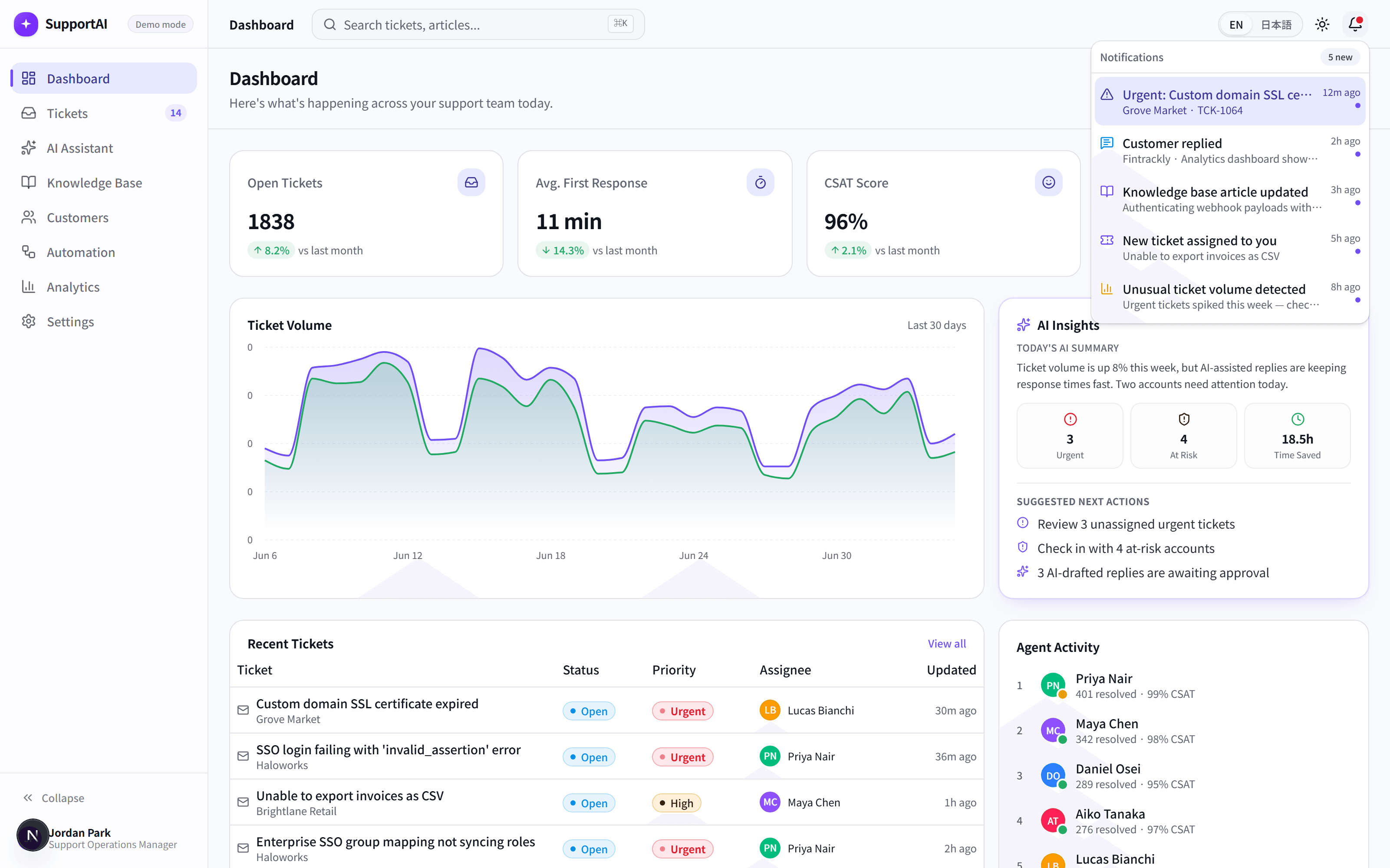
Notifications
A single feed of what actually needs an agent's attention, ranked by urgency instead of arrival time.
Signals are ranked by urgency and likely business impact, not just when they arrived.
Important signals — an urgent ticket, an at-risk customer — don't get lost in routine updates.
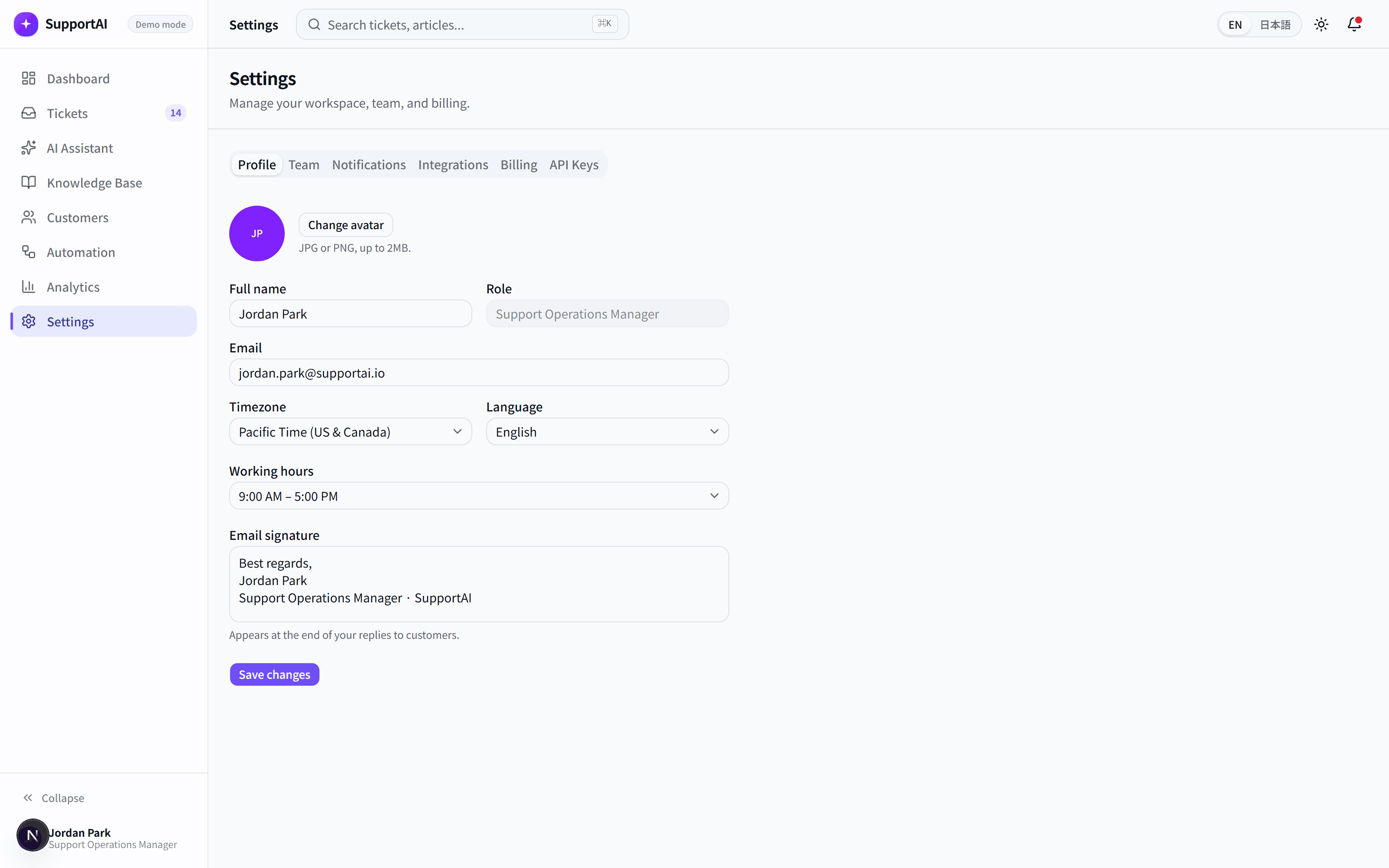
Settings
Profile, team, notifications, integrations, and billing — the everyday admin a support team actually touches.
Teams can configure their workspace without waiting on IT.
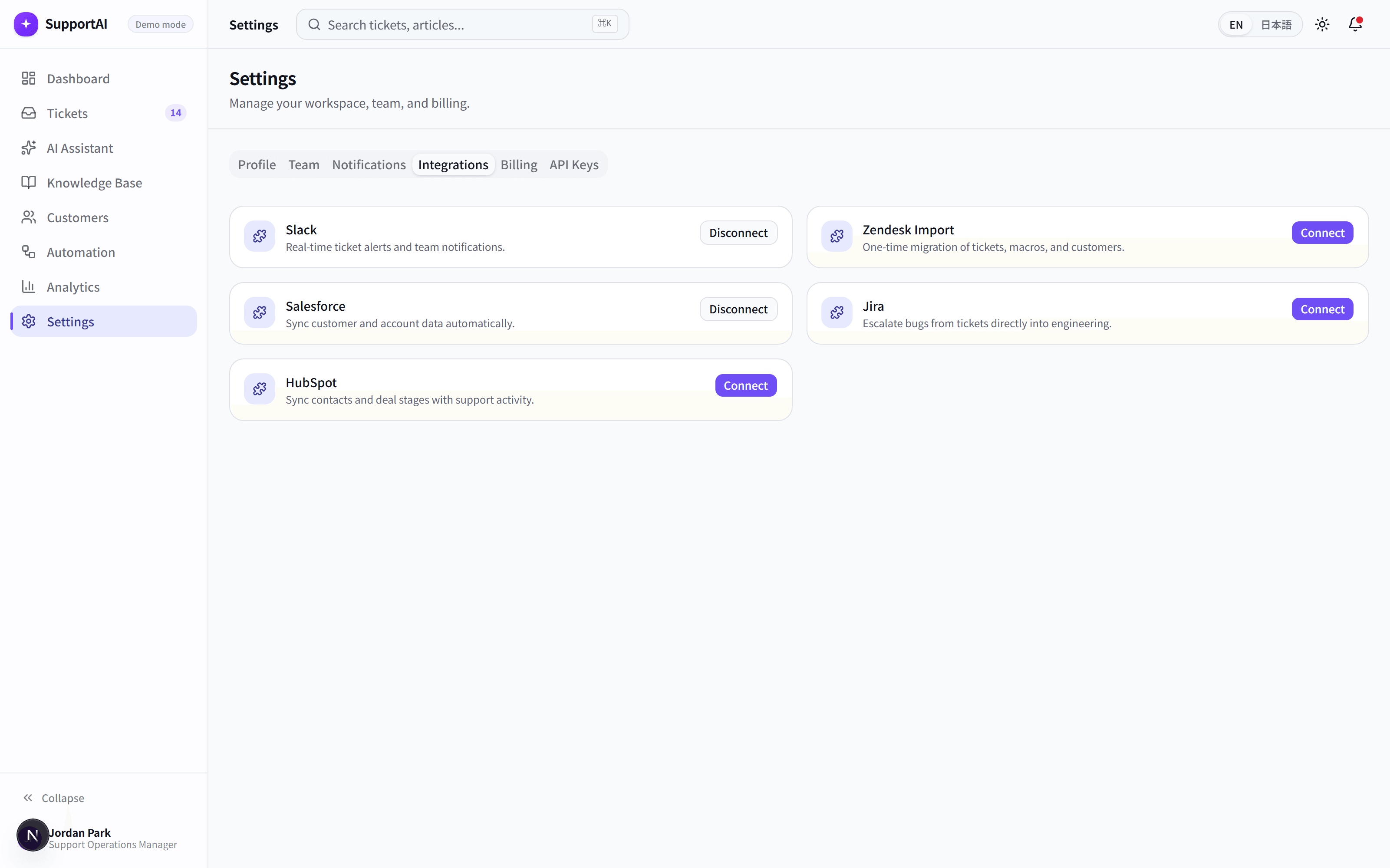
Integrations
Connect the tools a support team already runs on, with each connection scoped to exactly what it needs.
SupportAI fits into an existing stack instead of asking teams to replace it.
AI Throughout the Workflow
AI, built into the flow of support work.
SupportAI is a concept product that weaves AI directly into the ticket workflow agents already use, instead of adding it as a separate chat window. Reply drafting, summarization, and knowledge lookup all happen inside one workspace.
AI Reply Suggestion
- Problem
- Agents spend real time drafting replies to questions that are similar to ones they've answered before.
- Solution
- A suggested reply is generated from the ticket and the knowledge base, ready to send, edit, or regenerate.
- Business Impact
- Faster first responses without sounding like a form letter.
AI Ticket Summary
- Problem
- Long ticket threads take time to read before an agent can even start helping.
- Solution
- A concise summary of the conversation and what's been tried so far appears at the top of the ticket.
- Business Impact
- Agents get up to speed in seconds, not minutes.
AI Priority Detection
- Problem
- Urgent issues can sit unnoticed in a queue sorted only by arrival time.
- Solution
- Ticket content is analyzed to suggest a priority level, so urgent issues surface automatically.
- Business Impact
- Critical tickets get seen before they become escalations.
AI Sentiment Detection
- Problem
- A frustrated customer can look identical to a routine question in a plain ticket list.
- Solution
- Tone and sentiment are surfaced alongside each ticket, so agents know what they're walking into.
- Business Impact
- Agents respond with the right tone from the very first reply.
AI Knowledge Base Recommendation
- Problem
- Relevant help articles exist, but agents rarely have time to search for them mid-conversation.
- Solution
- Related articles are suggested automatically based on what the ticket is actually about.
- Business Impact
- Answers get reused instead of retyped from scratch.
AI Response Quality Support
- Problem
- Reply tone and accuracy can vary a lot between agents, especially newer ones.
- Solution
- Suggested replies are grounded in the knowledge base, keeping tone and facts consistent across the team.
- Business Impact
- Customers get a consistent experience no matter who replies.
AI Escalation Detection
- Problem
- Tickets that need a manager's attention often surface only after a customer asks for one.
- Solution
- Signals like repeated contact or negative sentiment flag a ticket as at risk of escalating.
- Business Impact
- Managers step in while there's still time to turn it around.
AI Support Analytics Insights
- Problem
- Spotting a trend in response times or ticket volume usually means building a spreadsheet by hand.
- Solution
- Dashboards surface trends in volume, response time, and satisfaction without manual reporting.
- Business Impact
- Managers coach based on patterns, not gut feel.
Enterprise & SaaS Capabilities
Built for a real support team, not just a demo
Support leaders ask about roles, integrations, and visibility before they ask about individual features. SupportAI was designed with those questions in mind.
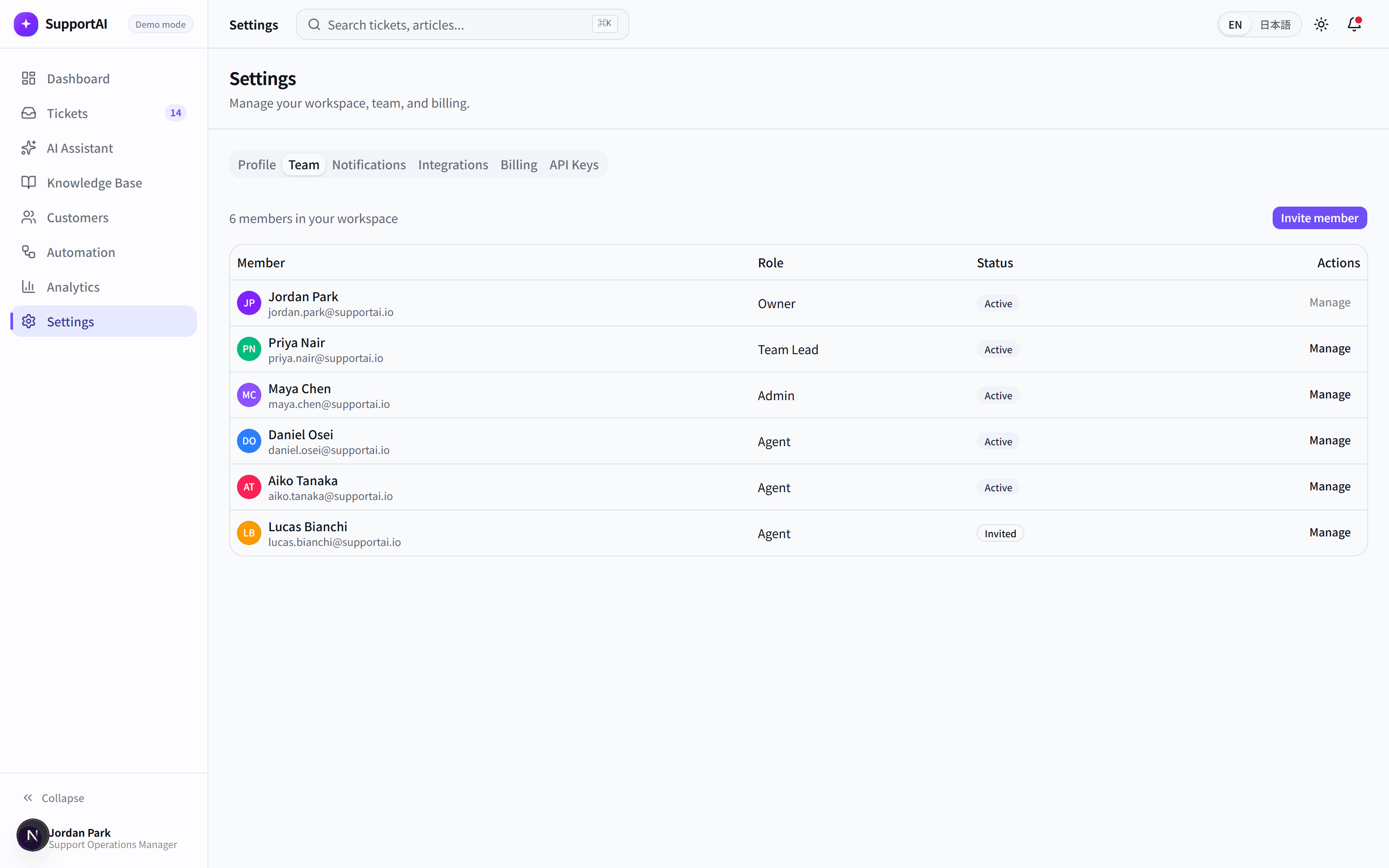
Team Management
Manage agents, roles, and workload from one place, with activity visible across the team.
Roles & Permissions
Role-based access so agents, team leads, and admins see exactly what they need to.
Integrations
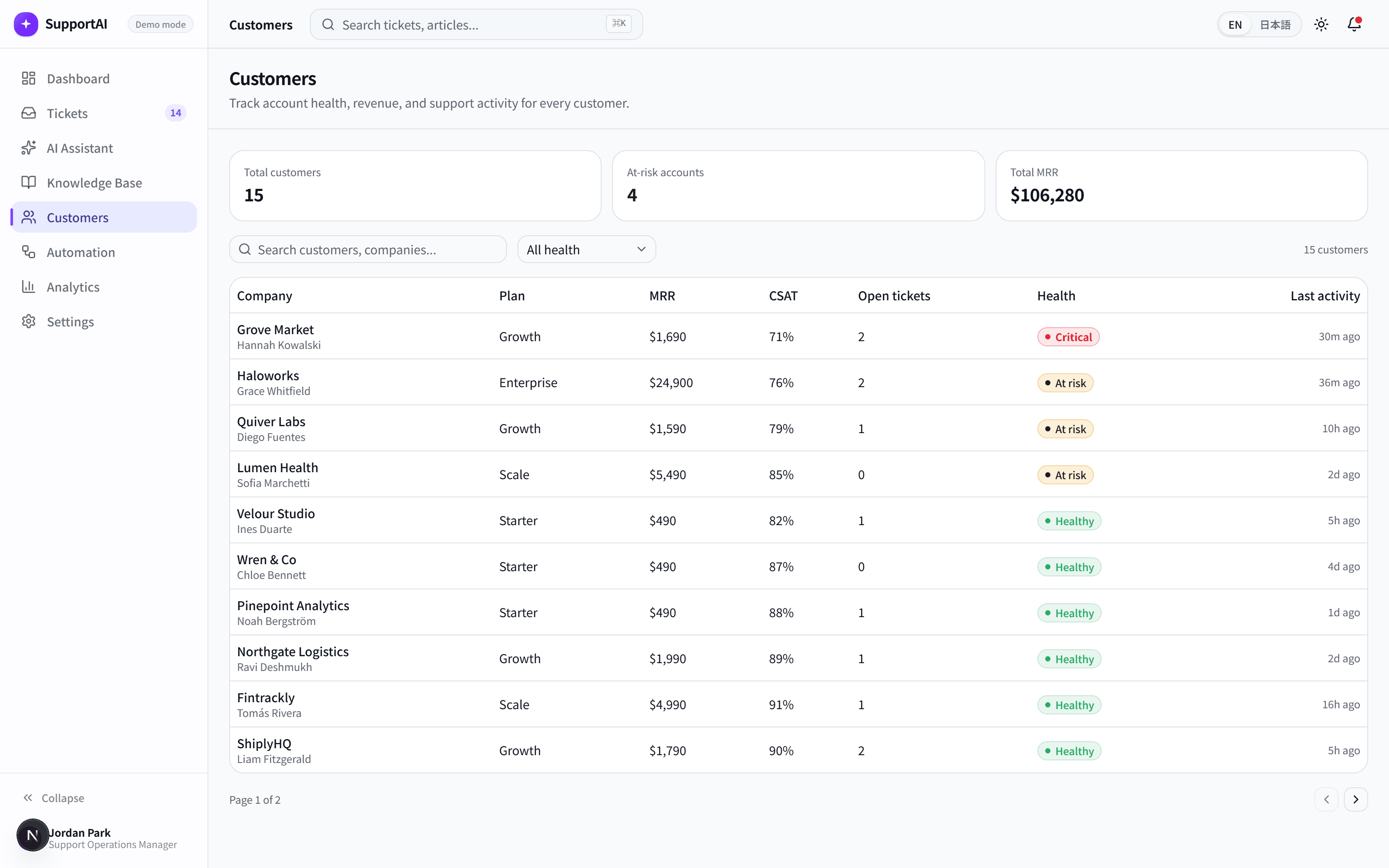
Connect the tools a support team already runs on, each scoped to exactly what it syncs.
Notifications
A prioritized notification system that surfaces what needs attention first, not just what arrived last.
Knowledge Base
A searchable, categorized library of help articles with authorship, freshness, and helpfulness tracked.
Analytics
Ticket volume, response time, CSAT, and channel breakdowns, ready for a weekly team review.
Settings & Billing
Profile, workspace, and billing controls a real team would expect to configure themselves.
Localization
A fully localized experience in English and Japanese, not just translated labels.
These are frontend demonstrations of real support-team workflows — built to show how the experience should work, not connected to live backend systems.
Technical Highlights
What NexM built
SupportAI isn't a mockup — it's a working frontend built the way a real product team would build it.
Technology Stack
Built with a modern, production-grade stack
The same tools a real product team would reach for — no shortcuts.
Next.js
Powers routing, rendering, and the app shell across the whole workspace.
React
Component-driven UI across every ticket, dashboard, and settings screen.
TypeScript
Type safety from the mock data layer through every component.
Tailwind CSS
A utility-first design system for fast, consistent styling.
Framer Motion
Subtle, purposeful motion across cards, panels, and transitions.
Local Mock Data
Realistic, locale-aware ticket and customer data powering every demo flow.
Component Architecture
A shared, reusable component library organized by feature.
Localization (i18n)
A structured translation system covering English and Japanese.
A concept product, built like a real one
Concept Project
A concept product, built like a real one
SupportAI is a concept product created by NexM. It doesn't have a live backend, a production database, or real customers — but every ticket, AI-assisted reply, and workflow was designed and built the way a real support-product team would build it. This concept project demonstrates NexM's UI/UX design, frontend development, and SaaS product-building capability.
See it for yourself
Explore the live prototype, or get in touch to talk about what NexM can build for your team.